ITAM
What is GLPI? Definition + 2026 Use Cases
GLPI explained for IT admins: definition, versions 11.0 vs 10.0, governance, real pricing, and when to migrate to modern SaaS alternatives.
16 min read
65% of SaaS applications used in enterprises run without IT approval (Gartner, 2025). If you don't know what you have, you can't secure it, budget for it, or decide what to do with it.
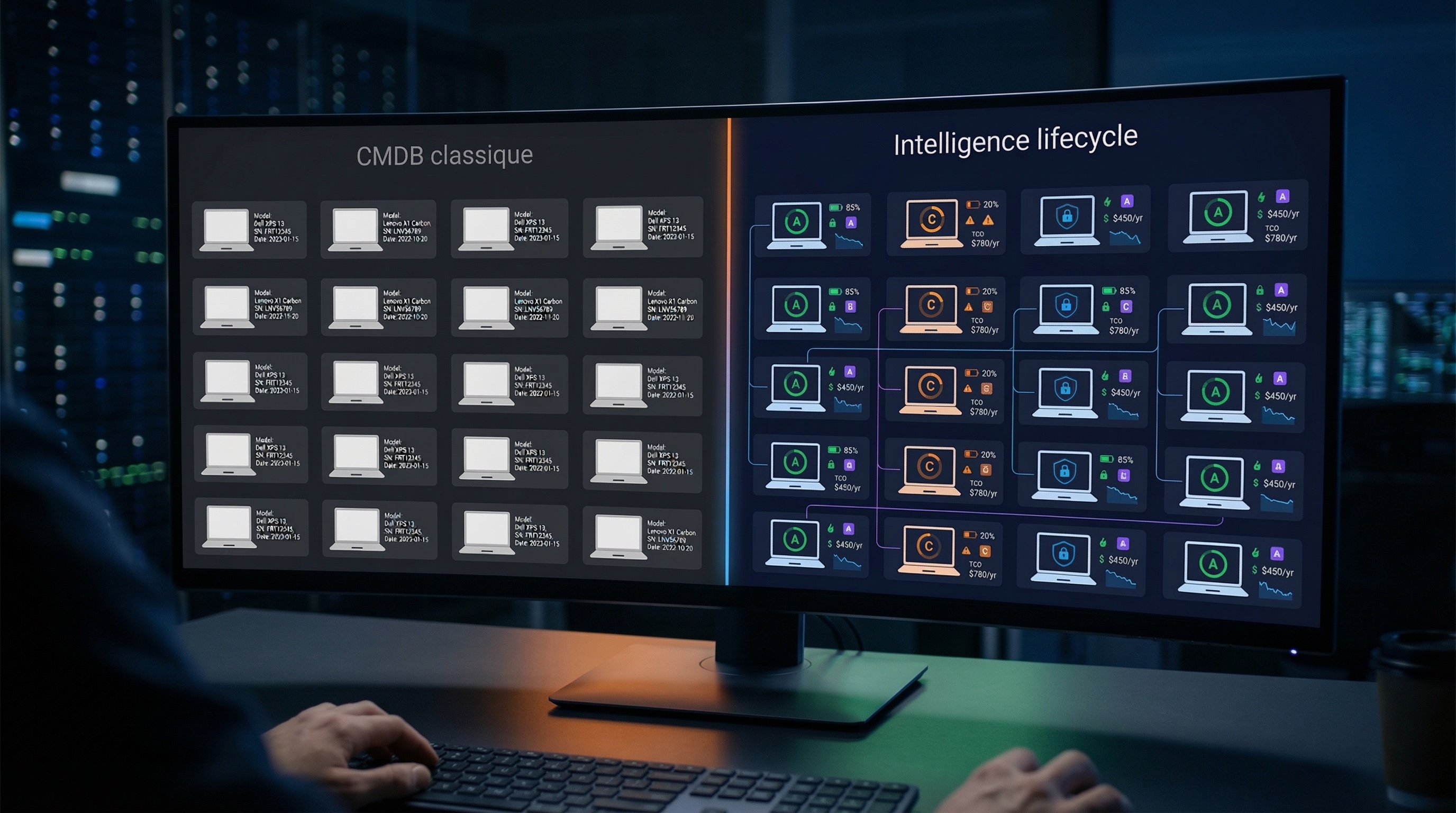
Your CMDB lists your CIs. Your MDM enforces compliance policies. Your discovery tool scans the network. Three layers in place — and yet, pick any device in your asset register. Can you tell instantly whether it's healthy? How much power it draws? What it actually costs? Probably not.
The problem isn't the absence of an IT asset inventory. It's the depth. Most IT inventory management programs answer one question: "what do I have?" This article shows how to answer seven — and how those seven answers feed directly into the Keep/Repair/Reallocate/Replace framework.
TL;DR: 40% of executives underestimate their IT fleet's obsolescence (France Num, 2025). Your CMDB lists your CIs — but does it answer the 7 critical questions about each device? Discovery, ITSM, and MDM layers cover questions 1-3. Questions 4-7 (health, security, energy, cost) require a lifecycle intelligence layer. 5-step method inside.
Citation capsule
An IT asset inventory is a living database that tracks every device, software package, and license across an organization. IT inventory management is the discipline of keeping that database accurate, complete, and actionable. The global ITAM market reached $6.58 billion in 2024 and will hit $16.25 billion by 2033, growing at 10.5% CAGR (Verified Market Reports, 2024). Inventory isn't a hygiene exercise anymore — it's a strategic pillar.
The scope goes well beyond workstations. Servers, mobile endpoints, printers, network peripherals, installed software, SaaS licenses, browser extensions — anything that touches IT belongs in the catalog. An incomplete asset register leaves blind spots. Blind spots cost money.
The real divide is between static and dynamic. A stale CSV export or an unsynchronized CMDB is a snapshot that ages overnight. New machine deployed, battery degrading, shadow app installed — nothing surfaces. A dynamic fleet catalog, by contrast, collects continuously through an endpoint agent. Automated alerts. Real-time health scores. Every change captured.
The global ITAM market reached $6.58 billion in 2024 and is growing at 10.5% CAGR (Verified Market Reports, 2024). The shift is from static asset registers to dynamic fleet catalogs that feed every decision — from a single battery swap to a full-site reallocation.
40% of executives underestimate the obsolescence of their IT equipment (France Num, 2025). Without a reliable inventory, you can't budget a refresh, detect a compromised endpoint, or arbitrate between keeping and replacing — regardless of organization size.
Five pressures converge in 2026.
Cost control. Ghost licenses represent 15-30% of SaaS spending (Flexera, 2025). Dormant endpoints — inactive for 30+ days — keep consuming licenses, power, and rack space. Without visibility, the IT budget absorbs invisible waste.
Security. Beyond costs, the security risk is equally pressing. 30-40% of enterprise IT spending is shadow IT (Gartner, 2025). The average additional cost of a shadow AI breach reaches $670,000 (IBM, 2025). Unpatched machines, unsigned applications, orphaned local accounts — everything your CMDB can't see.
Compliance. Meanwhile, GDPR, CSRD, and emerging Green IT regulations all require knowing where data lives, how much each device consumes, and what the digital carbon footprint looks like. Without granular per-CI data, audits become fiction.
Refresh decisions. As a result, without health data, you refresh blind. Too early: wasted budget. Too late: production outage. The data-driven refresh framework requires enriched inventory data to function.
Operational efficiency. Finally, at the daily operations level: onboarding: which devices are available in stock? Offboarding: which endpoints to reclaim and wipe? Lost machines, double-assigned units, ghost assets — problems a living fleet catalog solves upstream.
The cost of shadow IT goes beyond wasted licenses. When a breach involves unauthorized AI tools, the average bill climbs by $670,000 (IBM, 2025). Organizations that map their entire software ecosystem — SaaS subscriptions, browser extensions, AI agents — catch these risks before they become incidents.
A traditional inventory answers one question: "what do I have?" An intelligent inventory answers seven. These seven combined responses transform a static register into a decision-making tool — and feed the Keep/Repair/Reallocate/Replace framework for every device. In other words, the 7 questions close the gap between "listing CIs" and "governing a fleet."
1. Where is it? Physical location: site, building, floor, desk — or at the employee's home office. A CI with unknown location is a CI potentially lost. Network discovery catches the IP and VLAN, but not the physical address of a remote laptop.
2. Who uses it? Current user assignment, assignment history. Detection of unassigned devices (in stock? lost?) and duplicates — one employee with two laptops enrolled in your MDM.
3. Is it active? Last connection date, usage frequency. Dormant units (inactive 30+ days) are direct candidates for reallocation. They consume license fees, power, and space without producing anything.
4. Is it healthy? Three scores: hardware health (battery, S.M.A.R.T. disk, RAM), performance (boot time, crashes, responsiveness), security (patches, antivirus, encryption). This is the diagnostic core — and the first question your CMDB doesn't cover. Battery diagnostics alone can justify adding an intelligence layer.
5. Is it secure? TPM enabled, Secure Boot, BitLocker/FileVault, active and current antivirus, unsigned applications with elevated privileges, risky local accounts, expired certificates. Your MDM pushes policies — but does it measure the actual security posture of each endpoint?
6. How much energy does it consume? Real kWh measured per component — not estimated. Sleep blockers identified (Windows Update, OneDrive Sync, antivirus preventing sleep mode). Energy grade A through F. Green IT regulations require this data.
7. What does it cost? TCO per device: amortized purchase + energy + assigned licenses + repairs. Residual value. This is the data point that lets you compare "keep and repair" vs "replace."
Without questions 4-7, you have a directory. With them, you have a decision engine. That delta separates "I know what I have" from "I know what to do with it."
An effective IT asset inventory follows 5 steps: define the scope, audit your existing stack, collect baseline data, enrich with the 7 questions, and automate ongoing maintenance. At Montpellier Métropole and Hérault Logement, this method inventoried a fleet of around 7,500 devices in under 48 hours using sobrii (a project documented by the BIC de Montpellier).
Which sites? Headquarters, branch offices, remote workers. Which device types? Workstations, servers, mobile devices, printers, network peripherals. Which software? Locally installed, SaaS, browser extensions. Which KPIs? Coverage rate, data completeness, data freshness. Without a defined scope, the inventory stalls.
You probably already have part of the stack in place: discovery (Lansweeper, SCCM), CMDB (GLPI, ServiceNow), MDM (Intune, JAMF). The question isn't "which tool to pick." It's "which layers am I missing." Map your current tools against the 7 questions. The gaps surface immediately — usually starting at question 4.
Sync your existing CMDB (GLPI import, ServiceNow API) or deploy an endpoint agent. Deployment via GPO, SCCM, Intune, or PowerShell/Bash script — operational in 5 minutes per device. The goal: create the CI record for each device. Make, model, serial number, hardware specs, OS, user, network segment. The foundation.
This is the step 90% of organizations skip. And it's the most important one. An endpoint agent collects automatically: battery and disk health, security score, energy consumption, crash data, boot times. Each endpoint goes from a line in the CMDB to a full diagnostic record.
At Montpellier Métropole, this step targeted around 2,000 PC for lifecycle extension — degraded batteries invisible in the previous CMDB. Targeted replacement at €80K instead of a full fleet refresh. ROI: 18x.
Continuous collection. No annual inventory campaigns. Automated alerts: critical battery, machine inactive for 30 days, suspicious application, expiring certificate. A good tool correlates 500 raw alerts into 15 prioritized actions (sobrii field data, 2025). Every status change triggers a lifecycle reassessment.
At Montpellier Métropole, enriching a fleet of around 7,500 devices with questions 4-7 revealed that roughly 2,000 PC needed battery intervention — at a cost of €80K instead of a full fleet refresh (sobrii, 2025). An endpoint agent completed the inventory in under 48 hours.
Most IT directors already have a CMDB, an MDM, and a discovery tool in place. Each fills a specific role in the stack — but none was designed to measure real hardware health, energy consumption, or per-device TCO. Those are questions 4-7: the gap in your stack. 30-40% of IT spending is shadow IT (Gartner, 2025) — proof that existing layers don't catch everything.
Lansweeper, OCS Inventory, SCCM discovery. Scan the network, detect connected devices, pull hardware and software specs. The entry point — the layer that auto-populates the CMDB. Covers question 1 (where is it, via IP and VLAN) and partially question 2 (who uses it, via hostname or AD domain).
GLPI, ServiceNow, iTop, Snipe-IT. Structure CIs and their relationships (dependencies, contracts, SLAs), feed incident, problem, and change management. The central register. Covers questions 1-3 — if data is kept current. Which is rarely the case without upstream automation.
Intune, JAMF, Workspace ONE, SCCM. Deploy OS images, push compliance policies, manage patches and configurations. The endpoint security enforcement arm. Partially covers question 5 (security via compliance policies) — but measures neither real hardware health (battery S.M.A.R.T., thermal throttling, degraded RAM) nor actual power consumption.
The layer the other three don't cover. A lightweight endpoint agent (<1% CPU, <50 MB RAM) that continuously collects data for questions 4-7: hardware health scores, multi-dimensional security posture, real kWh per component, TCO and residual value. It plugs into your existing CMDB. Doesn't replace it. Enriches it.
| Question | Discovery | CMDB / ITSM | MDM / UEM | Lifecycle intelligence |
|---|---|---|---|---|
| 1. Location | ✅ Network scan | ✅ Structured CI | ✅ Enrollment | ✅ Agent |
| 2. Assignment | ⚠️ Hostname | ✅ If maintained | ✅ Enrollment | ✅ + history |
| 3. Activity | ❌ | ⚠️ If entered | ⚠️ Check-in | ✅ Real-time |
| 4. Hardware health | ❌ | ❌ | ❌ | ✅ 3 scores |
| 5. Security | ❌ | ⚠️ Static | ✅ Policies | ✅ 6 dimensions |
| 6. Energy | ❌ | ❌ | ❌ | ✅ Real kWh |
| 7. Cost / TCO | ❌ | ⚠️ Contracts | ❌ | ✅ Full TCO |
An IT department that stacks discovery, CMDB, and MDM without a lifecycle intelligence layer governs its fleet with 43% of the data (3 out of 7 diagnostic dimensions). Questions 4-7 — real hardware health, actual security posture, measured energy draw, full TCO — are precisely the inputs that determine whether a device should be kept, repaired, reallocated, or replaced.
A stale inventory is worse than no inventory — it creates false confidence. A static register loses reliability in under 90 days. The fix: an IT inventory management practice that updates itself and alerts when something changes.
Continuous collection. An endpoint agent reports data in real time. No annual audit campaigns. No manual refreshes. Every change — new machine, degrading battery, installed application — gets captured automatically.
Intelligent alerts. Degraded battery. Machine inactive for 30 days. Unsecured endpoint. Suspicious app installed. Certificate expiring in 30 days. A good tool correlates these signals: "28 degraded batteries" = 1 grouped action, not 28 individual tickets. 500 alerts → 15 actions.
Lifecycle connection. Every status change triggers an automatic reassessment: should this device be kept, repaired, reallocated to a less demanding role, or replaced? That's the closed loop between inventory and device lifespan management.
IT inventory management KPIs. Three metrics to track. Coverage rate: percentage of devices under agent (target: 100%). Completeness rate: percentage of the 7 questions answered per device. Freshness: average data age — target under 24 hours with an agent. Organizations that track all three consistently maintain higher data quality and catch degraded devices weeks before they become tickets.
The best IT inventory management approach uses a layered stack, not a single tool. Each layer has its role: Lansweeper or OCS for network discovery, GLPI or ServiceNow for CMDB/ITSM, Intune or JAMF for MDM/UEM. The gap usually sits at questions 4-7 — hardware health, energy consumption, security posture, and per-device TCO. That's the lifecycle intelligence layer an endpoint agent like sobrii covers, plugging into your existing tools without replacing them.
Your CMDB structures CIs and feeds incident management — that's essential. But it doesn't measure real hardware health (battery, S.M.A.R.T. disk), per-device energy consumption, or operational TCO. Those are questions 4-7 — the lifecycle intelligence layer that transforms a static register into a lifecycle decision tool.
Manual CMDB entry by technicians: 2-3 months for 500 devices — a process that ties up resources and produces data that's already stale by the time it's done. Network discovery tool (Lansweeper, OCS Inventory): about 2 weeks, but without health or energy data. Automated endpoint agent: 48 hours, even for thousands of devices — that's how long it took to inventory a fleet of around 7,500 endpoints at Montpellier Métropole and Hérault Logement with sobrii, including all 7 diagnostic dimensions.
Yes, it's non-negotiable. 65% of SaaS applications run without IT approval (Gartner, 2025), and ghost licenses represent 15-30% of SaaS spending (Flexera, 2025). Without a software inventory, you can't detect shadow IT, optimize license costs, or guarantee GDPR and CSRD compliance. A complete IT inventory management practice covers hardware, installed software, SaaS subscriptions, and browser extensions.
Ideally in real time through an endpoint agent. Otherwise, quarterly audits are the minimum. An inventory older than 90 days loses reliability — especially for health data (battery, disk) and security data (patches, antivirus) that shift daily. Battery health can drop 10 points in weeks.
IT inventory management isn't about maintaining a list. It's about building a decision engine that answers 7 questions per device.
sobrii adds the IT inventory management layer your CMDB doesn't cover — health, energy, cost, and lifecycle decisions in 48 hours.
Discover how sobrii transforms IT fleet management.
Book a demo