CMDB Guide 2026: ITSM-Grade Config Database
75-80% of CMDB projects fail to deliver business value (Gartner, 2018 — revalidated in 2026). Yet the global CMDB market reached $1.67 billion in 2024, growing at 15.2% CAGR (Growth Market Reports, 2025). Why does a tool this widespread fail this often?
The problem is not the absence of a CMDB. It is the depth. Most configuration management databases answer questions 1 through 3 about each device — location, assignment, activity — while skipping questions 4 through 7: hardware health, real security posture, energy consumption, and total cost of ownership.
This guide covers the ITIL definition, what a CMDB actually contains, how it differs from ITAM, a GLPI/ServiceNow/iTop/Snipe-IT comparison, a 5-step deployment method, and the lifecycle intelligence layer that turns a configuration register into a decision-making tool.
TL;DR: 75% of CMDB projects fail to deliver business value (Gartner). The problem is not the tool — it is depth. Your CMDB lists CIs and relationships (questions 1-3: location, assignment, activity). But it does not answer questions 4-7: hardware health, real security posture, energy consumption, TCO per device. This guide covers the ITIL definition, CMDB vs ITAM, a GLPI/ServiceNow/iTop/Snipe-IT comparison, and the 5-step deployment method — starting with the gap in your stack.
Citation capsule
- 75-80% of CMDB projects fail to deliver business value (Source: Gartner, 2018 — revalidated in 2026).
- The global CMDB market reached $1.67 billion in 2024, growing at 15.2% CAGR (Source: Growth Market Reports, 2025).
- Fewer than 50% of organizations trust the data in their CMDB (Source: Forrester, 2025).
What is a CMDB?
A CMDB (Configuration Management Database) is a database that records every configuration item (CI) in an organization and the relationships between them. In the ITIL framework, the CMDB is the backbone of configuration management — it feeds change management, incident management, and problem management processes.
A CMDB — Configuration Management Database — records every configuration item (CI) in an organization and the relationships between them. In the ITIL framework, the CMDB feeds change, incident, and problem management. It is a single source of truth for configuration data — not a simple asset list.
A CI is any component that needs to be managed to deliver an IT service. Hardware (servers, workstations, mobile devices, printers), software (applications, licenses, SaaS subscriptions), network components (switches, firewalls, VPN concentrators), services (email, ERP, CRM), and documentation (contracts, SLAs) — all qualify as CIs.
The difference between a CMDB and a simple inventory spreadsheet is relationships. An inventory tells you that Server A exists. A CMDB tells you that Server A hosts Application B, which depends on Database C, which is backed up by Service D. When Server A goes down, you instantly see the blast radius.
The CMDB functions as a single source of truth for configuration data. Every ITSM process — from a routine change request to a critical incident — should reference it. Without that central register, teams work from disconnected spreadsheets, ticket history, and tribal knowledge. Dependencies get missed. Changes break production.
The concept has evolved significantly since its introduction. In ITIL v2, the CMDB was a monolithic, standalone database — often a single SQL instance manually maintained by a configuration manager. ITIL v3 introduced the Configuration Management System (CMS), a federated model that aggregates data from multiple sources. ITIL v4 pushes further toward a service-centric view: the CMDB is one data source among many, feeding a broader Service Value System.
That evolution matters because it explains why the static, standalone CMDB of the early 2000s kept failing. A CMDB that cannot pull data automatically from discovery tools, MDM platforms, and endpoint agents becomes stale within weeks — and stale data is worse than no data.
The CMDB market is projected to grow from $1.67 billion in 2024 to over $6 billion by 2033 at 15.2% CAGR (Growth Market Reports, 2025). That growth signals a real need — but market size does not equal project success. Understanding what a CMDB can and cannot do is the first step toward avoiding the 75% failure rate.
What data does a CMDB contain?
A CMDB stores three types of data: the CIs themselves (every managed IT asset), their attributes (make, model, OS, location, owner), and the relationships that link them (dependencies, hosting, connections). Fewer than 50% of organizations trust the data in their CMDB (Forrester, 2025). That trust deficit starts with understanding what the data model covers — and what it leaves out.
A CMDB stores three types of data: the CIs themselves (every managed IT asset), their attributes (make, model, OS, location, owner, status), and the relationships that connect them (dependencies, hosting, connections). This identity-properties-links triad forms the backbone of your IT register.
CI types. Hardware: servers, workstations, mobile devices, printers. Software: locally installed applications, SaaS licenses, browser extensions. Network: switches, routers, firewalls, load balancers. Services: email platform, ERP, CRM, intranet. Documentation: vendor contracts, SLAs, compliance certificates.
Standard attributes. Each CI record typically includes: unique identifier, name, CI type, version, physical location, assigned owner, status (active, in stock, decommissioned), and purchase date. ServiceNow's Common Service Data Model (CSDM) is one widely adopted schema that standardizes these attributes across enterprise deployments.
Relationships. This is where the CMDB earns its value. Five core relationship types dominate: depends on (Application X depends on Server Y), hosted on (VM hosted on hypervisor), connected to (workstation connected to printer), used by (service used by business unit), and backed up by (database backed up by replication service). Without relationships, a CMDB is just an inventory with extra fields.
The limit is structural: standard CMDB attributes cover identity and location — not health, not energy, not cost. A workstation CI tells you it is a Dell Latitude 5540 assigned to Jane in Building C. It does not tell you that the battery holds 62% of design capacity, the SSD logged 14 reallocated sectors last month, or the device draws 47 kWh per quarter. Those data points live elsewhere — or nowhere.
Fewer than 50% of organizations trust the data in their CMDB (Forrester, 2025). The trust deficit is not just about stale records or missing fields. It is about scope: even a perfectly maintained CMDB covers identity, location, and status — but not the hardware health, energy consumption, and cost data that drive fleet decisions.
CMDB vs ITAM: what is the difference?
The CMDB and ITAM answer two different questions. The CMDB answers "what is connected and how?" — relationships, dependencies, impact analysis. ITAM answers "what do I own and what does it cost?" — licenses, contracts, financial lifecycle. The two are complementary, and confused 9 times out of 10. The ITAM market reached $6.58 billion in 2024 and is projected to hit $16.25 billion by 2033 (Verified Market Reports, 2024).
The CMDB answers "what is connected and how?" — relationships, dependencies, impact analysis. ITAM answers "what do I own and what does it cost?" — licenses, contracts, financial lifecycle. The two are complementary. Confusing them is like using an architect's blueprint to run your accounting.
CMDB focus. Relationships and dependencies between CIs. A CMDB maps that Application X runs on Server Y, which connects to Storage Z. When Server Y goes offline, the CMDB shows the downstream impact. It feeds change management (will this change break something?), incident management (what else is affected?), and problem management (is this a recurring pattern?). The ITIL framework positions the CMDB as a core component of service management.
ITAM focus. Financial lifecycle of assets. An ITAM platform tracks purchase date, depreciation schedule, warranty expiration, license entitlements, contract renewal dates, and compliance status. It answers: are we over-licensed for Adobe Creative Cloud? When does the leasing contract for floor-3 workstations expire? What is the book value of the laptop assigned to the departing employee?
The convergence point. The same CI exists in both systems — but with different attributes. The CMDB records that Workstation CI-00472 depends on the ERP server. The ITAM platform records that CI-00472 was purchased on 2023-06-15, is depreciated over 4 years, and carries a $1,200 book value. Same device, different lenses.
Why confusing them costs money. A CMDB does not manage licenses — so relying on it for software compliance is a recipe for audit fines. An ITAM platform does not map dependencies — so using it to assess change impact is guesswork. Organizations that treat them as interchangeable end up with neither function working properly.
Neither the CMDB nor ITAM covers questions 4-7: real hardware health, measured energy consumption, per-device TCO beyond book value, or data-driven lifecycle decisions. Those require a different layer entirely. More on that in the IT asset inventory guide.
The CMDB market is growing at 15.2% CAGR while the ITAM market grows at 10.5% (Growth Market Reports, Verified Market Reports). Both are expanding because organizations are realizing they need structured data about their fleet. But neither system, alone or combined, answers the hardware health and energy questions that drive lifecycle decisions.
Why does your CMDB only answer 3 out of 7 questions?
Open your CMDB. Pick a random workstation. You know its make, model, assigned user, and location. But can you instantly tell whether it is healthy? How much power it draws in kWh? What it actually costs to operate? Probably not. That is expected: your CMDB covers questions 1 through 3. Questions 4 through 7 require a different layer. Organizations with well-managed CMDBs see 38% faster incident resolution and 82% fewer failed changes (industry benchmarks, 2025) — but those gains apply only to the questions the CMDB was built to answer.
Open your CMDB. Pick any workstation. You know its make, model, user, and location. But can you tell instantly if it is healthy? How much it draws in kWh? What it actually costs per month? Your CMDB covers questions 1 through 3. Questions 4 through 7 require a different layer entirely.
Every device in your fleet should answer seven questions. The IT asset inventory guide covers them in depth. In summary:
- Where is it? Physical location — site, building, floor, desk, or remote.
- Who uses it? Current assignment, assignment history.
- Is it active? Last connection date, usage frequency.
- Is it healthy? Battery capacity, S.M.A.R.T. disk data, RAM errors, thermal throttling.
- Is it secure? Patches applied, BitLocker/FileVault enabled, unsigned apps, TPM status.
- How much energy does it consume? Real kWh per component — not estimated.
- What does it cost? Full TCO: amortized purchase + energy + licenses + repairs.
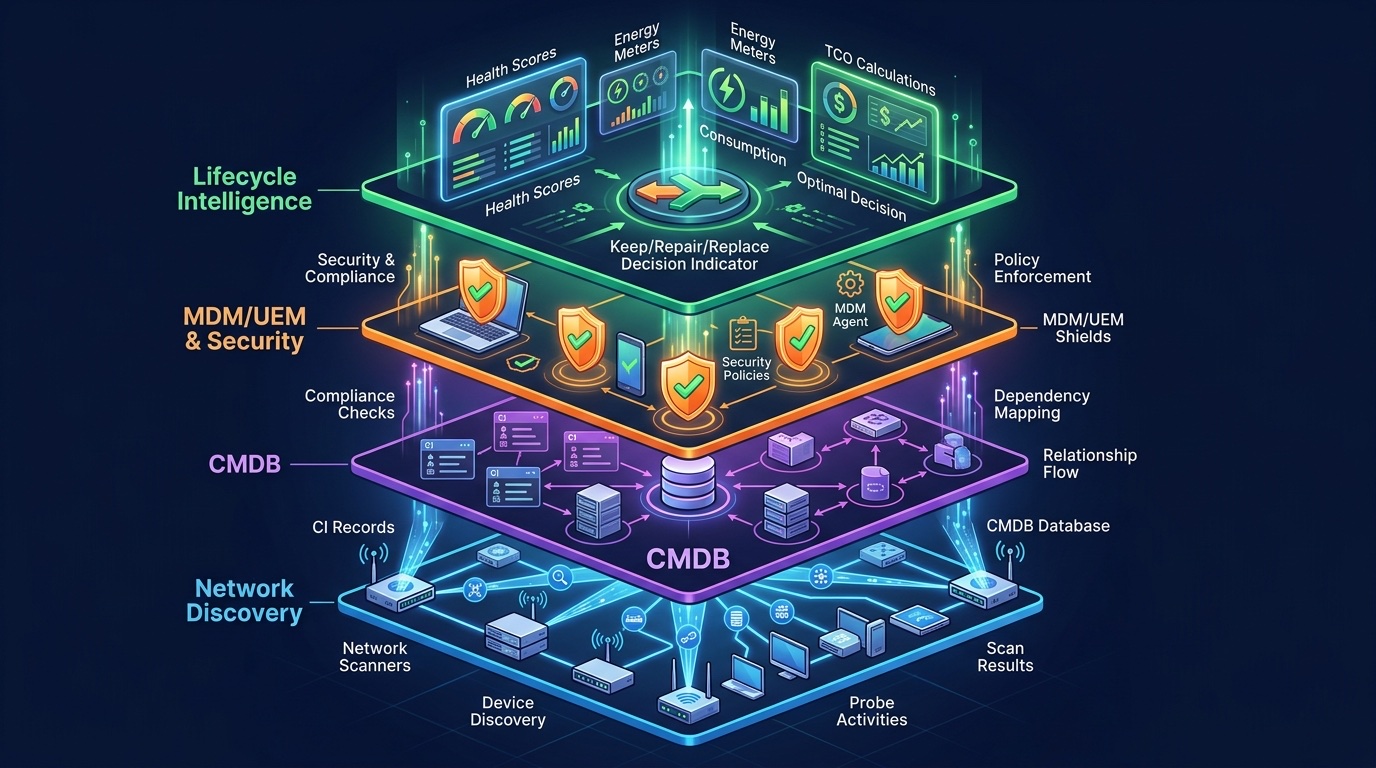
The 4 layers of your IT stack
Your IT stack answers these questions across four distinct layers. The gap becomes visible when you map each layer against the seven questions.
| Question per device | Discovery | CMDB / ITSM | MDM / UEM | Lifecycle intelligence |
|---|---|---|---|---|
| 1. Location | Covered | Covered | Covered | Covered |
| 2. Assignment | Partial | Covered | Covered | Covered |
| 3. Activity | Not covered | Partial | Partial | Covered |
| 4. Health | Not covered | Not covered | Not covered | Covered |
| 5. Security | Not covered | Partial | Covered | Covered |
| 6. Energy | Not covered | Not covered | Not covered | Covered |
| 7. Cost / TCO | Not covered | Partial | Not covered | Covered |
Layer 1 — Discovery. Lansweeper, OCS Inventory, SCCM. Scans the network, detects connected devices, pulls hardware and software specs. Covers question 1 (location via IP/VLAN) and partially question 2 (assignment via hostname or AD).
Layer 2 — CMDB / ITSM. GLPI, ServiceNow, iTop. Structures CIs, maps relationships, feeds incident and change management. Covers questions 1-3 — if the data is kept current.
Layer 3 — MDM / UEM. Intune, JAMF, Workspace ONE. Pushes compliance policies, manages patches. Covers question 5 (security via policies) — but does not measure real hardware health or energy consumption.
Layer 4 — Lifecycle intelligence. The layer the other three miss. A lightweight endpoint agent that continuously collects data for questions 4-7: hardware health scores, real kWh per component, full TCO, and lifecycle decision signals.
This is why 75% of CMDB projects fail to deliver value. The tool works as designed — it was never designed to answer questions 4 through 7. The failure is not in the CMDB. It is in expecting the CMDB to be the entire answer.
Organizations with well-managed CMDBs resolve incidents 38% faster and experience 82% fewer failed changes (industry benchmarks, 2025). But a CMDB with 98% data normalization (Flexera, 2025) still covers the same 3 out of 7 questions. The remaining four — health, security posture, energy, and cost — are not a data quality problem. They are a data scope problem.
How do you choose a CMDB tool?
The right CMDB tool depends on three factors: fleet size, ITSM maturity, and budget. Four tools dominate the market globally: GLPI (open source, dominant in France and Europe), ServiceNow (enterprise leader), iTop (open source, integrated CMDB + ITSM), and Snipe-IT (open source, ITAM-focused).
The right CMDB tool depends on fleet size, ITSM maturity, and budget. GLPI dominates open-source deployments in Europe. ServiceNow leads the enterprise segment. iTop combines CMDB and ITSM in one platform. Snipe-IT is the simplest starting point for asset tracking. Choose scope first, then tool.
GLPI. Open source, free to deploy. Native CMDB plugin, built-in GLPI Agent for network discovery, AD/LDAP integration. Rated 4.9/5 on Gartner Peer Insights. Dominant in government, education, and SMBs — especially in French-speaking markets. Requires internal competence to maintain (no managed SaaS offering from the core project). Best for organizations with 100-10,000 endpoints and an IT team comfortable with open-source administration.
ServiceNow. The enterprise leader. Full CMDB with CSDM (Common Service Data Model), Service Mapping for automatic dependency discovery, and deep ITSM integration. Rated 4.3/5 on Gartner Peer Insights (1,953 reviews). Powerful but expensive — implementation timelines of 6-12 months are common, and license costs can reach six figures annually. Best for large enterprises with mature ITSM processes and dedicated platform teams.
iTop. Open source, CMDB and ITSM combined in a single platform. Flexible data model that adapts to custom CI types and relationships. Active community, particularly strong in European markets. A credible alternative to ServiceNow for organizations that need ITSM workflows tied to their CMDB without the enterprise price tag. Best for mid-market organizations that want configuration management and service management in one tool.
Snipe-IT. Open source, focused on IT asset management rather than configuration management. Tracks hardware, licenses, accessories, and consumables. The CMDB capabilities are basic — it handles CI attributes well but lacks the deep relationship mapping of GLPI or ServiceNow. Best for organizations starting from scratch that need asset tracking first and plan to add CMDB capabilities later.
The trap: choosing the tool before defining the scope. Every failed CMDB project starts with a tool selection. The scope should come first. Which CI types matter? Which relationships do you need to map? Which ITSM processes will consume CMDB data? Answer those questions, then evaluate tools. A GLPI instance with 20 well-defined CI types and automated discovery will outperform a ServiceNow deployment with 200 CI types and manual data entry.
GLPI scores 4.9/5 on Gartner Peer Insights versus ServiceNow at 4.3/5 — but the comparison is not apples to apples. GLPI excels in smaller, self-managed environments. ServiceNow dominates in large enterprises with complex service architectures. The right choice depends on fleet size, ITSM maturity, and whether you have the internal team to manage an open-source platform.
How do you deploy a CMDB successfully?
A successful CMDB deployment follows five steps: scope the critical 20% of CIs first, automate collection from day one, structure a simple data model, wire it into ITSM workflows, and measure freshness continuously. 75% of CMDB projects fail for three documented reasons: scope too broad, data not automated, and no alignment with business processes (Gartner, 2018 — revalidated in 2026).
The success of a CMDB deployment is not measured by CI coverage percentage — it is measured by whether ITSM teams actually use it before every change and incident. A CMDB at 60% coverage integrated into every workflow beats a 100%-coverage database that nobody consults.
Step 1 — Define the scope. Start with the critical CIs: production servers, user workstations, core network infrastructure. Not "everything." The 80/20 rule applies: 20% of CIs carry 80% of business impact. A CMDB that covers those 20% completely is infinitely more valuable than one that covers 100% of CIs with incomplete data.
Step 2 — Automate collection. Discovery tools plus endpoint agents. Never rely on manual entry as the primary data source. Manual CMDB entry for 500 devices: 2-3 months. Automated endpoint agent: 48 hours. The Métropole de Montpellier and Hérault Logement deploy sobrii across a fleet of roughly 7,500 endpoints (project documented by the BIC de Montpellier) — automated collection reached the device count in days, where the existing CMDB had taken months with significant data gaps.
Step 3 — Structure the data model. Define CI types, mandatory attributes, and relationships. ServiceNow's CSDM is a reference architecture, but a simple three-tier schema (hardware -> software -> service) is enough to start. Over-engineering the data model before you have clean data is a common cause of stagnation.
Step 4 — Integrate with ITSM processes. A CMDB has value only if it feeds change management, incident management, and problem management workflows. A CI that is never linked to a ticket is a CI that will go stale. Every change request should reference the impacted CIs. Every major incident should trace the dependency chain.
Step 5 — Measure and maintain. Three KPIs: coverage rate (what percentage of devices are in the CMDB), completeness rate (what percentage of mandatory attributes are filled), and data freshness (average age of the last update). A register that has not been refreshed in 90 days loses reliability. With an automated agent, freshness stays under 24 hours.
The 3 mistakes every IT director makes
Mistake 1: Trying to inventory everything at once. The urge to achieve 100% coverage before going live leads to projects that stall in the data collection phase. Start with the 20% of CIs that matter most.
Mistake 2: Relying on manual entry. Technicians entering data into CMDB forms produces records that are stale before they are complete. Automated discovery and agent-based collection are non-negotiable.
Mistake 3: Deploying the CMDB without ITSM workflows. A CMDB without processes consuming its data is a database nobody uses. The CMDB must be wired into ticket creation, change approval, and incident triage from day one.
At the Métropole de Montpellier, the existing CMDB contained 100% of serial numbers — but 0% of battery health scores, 0% of energy consumption data, and 0% of real per-device TCO. The CMDB was not wrong. It was incomplete. Enriching it with questions 4-7 revealed degraded batteries — invisible in the previous register. The lifecycle project targets roughly 2,000 PCs for a two-year extension, and the initiative cuts hardware purchases and the fleet's carbon footprint.
The detailed 5-step IT inventory methodA CMDB populated manually takes 2-3 months for 500 devices. An automated endpoint agent covers the same scope in 48 hours (sobrii, Métropole de Montpellier — fleet of roughly 7,500 devices). Speed is not the only advantage: automated data stays fresh. Manual data decays the moment a technician closes the form.
What is lifecycle intelligence and why does your CMDB need it?
Discovery populates the CMDB. The MDM secures the endpoints. But who measures real hardware health, energy consumption, and per-device TCO? No one — unless you add a lifecycle intelligence layer. It is the fourth layer of the IT stack, the one that turns "I know what I have" into "I know what to do with it."
Discovery populates the register. The CMDB structures relationships. The MDM pushes policies. But none of these three layers measures real hardware health, energy consumption in kWh, or operational TCO per device. That is the gap — and it explains why most CMDB projects underdeliver.
The 4-layer stack model maps the territory: Discovery (layer 1) -> CMDB/ITSM (layer 2) -> MDM/UEM (layer 3) -> Lifecycle intelligence (layer 4). Layers 1-3 are mature, widely deployed, and well understood. Layer 4 is where the gap lives — and where the 7-question model becomes actionable.
What layer 4 adds. Hardware health scores: battery capacity trends, S.M.A.R.T. disk diagnostics, RAM error rates. Real energy data: measured kWh per component, sleep blocker identification, energy grades A through F. Operational TCO: amortized purchase cost + measured energy + assigned licenses + repair history. And the decision output: for each device, a data-driven recommendation to Keep, Repair, Reallocate, or Replace.
How it works in practice. A lightweight endpoint agent (under 1% CPU, under 50 MB RAM) collects this data continuously and feeds it back into the existing CMDB as enriched attributes. It does not replace GLPI, ServiceNow, or Intune. It plugs into them. The CMDB remains the single source of truth for CI identity and relationships. The lifecycle intelligence layer adds the diagnostic depth that drives fleet decisions.
At the Métropole de Montpellier, adding layer 4 to a fleet of roughly 7,500 devices uncovered degraded batteries that drove targeted replacement instead of a blind fleet refresh. The CMDB told them what they had. Layer 4 told them what to do with it.
The shift is from "I know what I have" to "I know what to do with it." That shift requires answering all seven questions per device — not just the three your CMDB was designed to cover. Green IT fleet management and shadow IT governance both depend on this enriched data layer.
Discover the sobrii platform | Request a fleet audit
When sobrii was deployed on the Métropole de Montpellier fleet (roughly 7,500 devices), the existing CMDB contained 100% of serial numbers — but 0% of battery health scores, 0% of energy consumption data, and 0% of real per-device TCO. The CMDB was not wrong. It was incomplete. That single insight — scope, not quality — is why 75% of CMDB projects underdeliver.
FAQ
What is a CMDB in IT?
A CMDB (Configuration Management Database) is a database that records every configuration item (CI) in an organization — hardware, software, services — and the relationships between them. In the ITIL framework, it is the backbone of configuration management, feeding change, incident, and problem management processes. The global CMDB market reached $1.67 billion in 2024 (Growth Market Reports, 2025).
What is the difference between a CMDB and ITAM?
The CMDB answers "what is connected and how?" — relationships, dependencies, impact analysis. ITAM answers "what do I own and what does it cost?" — licenses, contracts, financial lifecycle. The two are complementary, not interchangeable. The same CI exists in both systems but carries different attributes: the CMDB tracks dependencies, ITAM tracks depreciation and contract terms.
Why do 75% of CMDB projects fail?
Three root causes (Gartner): scope defined too broadly at launch, reliance on manual data entry that goes stale within 90 days, and no alignment between the CMDB and ITSM workflows. A CMDB that does not feed change management and incident triage is a database that nobody consults — and nobody maintains.
What is the best open-source CMDB tool?
GLPI dominates in European deployments — especially government, education, and SMBs — with a 4.9/5 rating on Gartner Peer Insights. iTop offers a strong alternative with its integrated CMDB + ITSM model and flexible data schema. Snipe-IT is the simplest starting point, focused on asset tracking with basic CMDB capabilities.
My CMDB is already in place — why add another layer?
Your CMDB structures CIs and feeds incident workflows. But it does not measure real hardware health (battery capacity, S.M.A.R.T. disk data), per-device energy consumption in kWh, or operational TCO. Those are questions 4 through 7 — the lifecycle intelligence layer that transforms a static configuration register into a fleet decision engine.
A CMDB is essential — and insufficient. The takeaways:
- 75-80% of CMDB projects fail because they try to be more than a configuration register without the data depth to support it
- CMDB and ITAM are complementary, not interchangeable — different questions, different data, different processes
- Your IT stack has 4 layers: Discovery, CMDB/ITSM, MDM/UEM, and Lifecycle intelligence — most organizations are missing layer 4
- 7 questions per device separate a static register from a decision engine — your CMDB covers questions 1-3
- Questions 4-7 (health, security, energy, cost) require a lifecycle intelligence layer that plugs into your existing CMDB
Discover what your CMDB does not see — request a sobrii fleet audit.
Sources
- Gartner — IT and technology research newsroom. https://www.gartner.com/en/newsroom (accessed 2026-05-05)
- Forrester — Technology research. https://www.forrester.com/technology/ (accessed 2026-05-05)
- Microsoft — Windows 11 requirements. https://learn.microsoft.com/en-us/windows/whats-new/windows-11-requirements (accessed 2026-05-05)
- Verizon Business — 2025 Data Breach Investigations Report. https://www.verizon.com/about/news/2025-data-breach-investigations-report (accessed 2026-05-05)
- ADEME — Digital and environment impact update, 2025. https://www.ademe.fr/presse/communique-national/numerique-environnement-entre-opportunites-et-necessaire-sobriete/ (accessed 2026-05-05)
Manage your IT fleet with sobrii
Discover how sobrii transforms IT fleet management.
Book a demo